Video Editing with Claude and Codex: What a Kapara Battle Taught Us
Video editing with Claude and Codex works like this today: you describe what you want in words, out loud in the video or in a written prompt, and the tool writes and runs code that adds captions, elements that land on a word, zooms, color and text behind the speaker. To see which one listens better, we gave both the same footage and the same words, in three different styles.
The battle: same footage, same words, no cuts
Rina from Only in Israel spoke to camera and said, in each round, how she wanted to be edited: an elegant round with a carousel of her videos around her, a viral round with her name huge behind her, and a round of live commands, "zoom", "neon", "cut". Both tools got the same file and the same transcript, with one hard rule: no cutting, trimming or speed changes. So the two versions run in perfect sync, Claude on top and Codex on the bottom, and you can see word for word who did what.
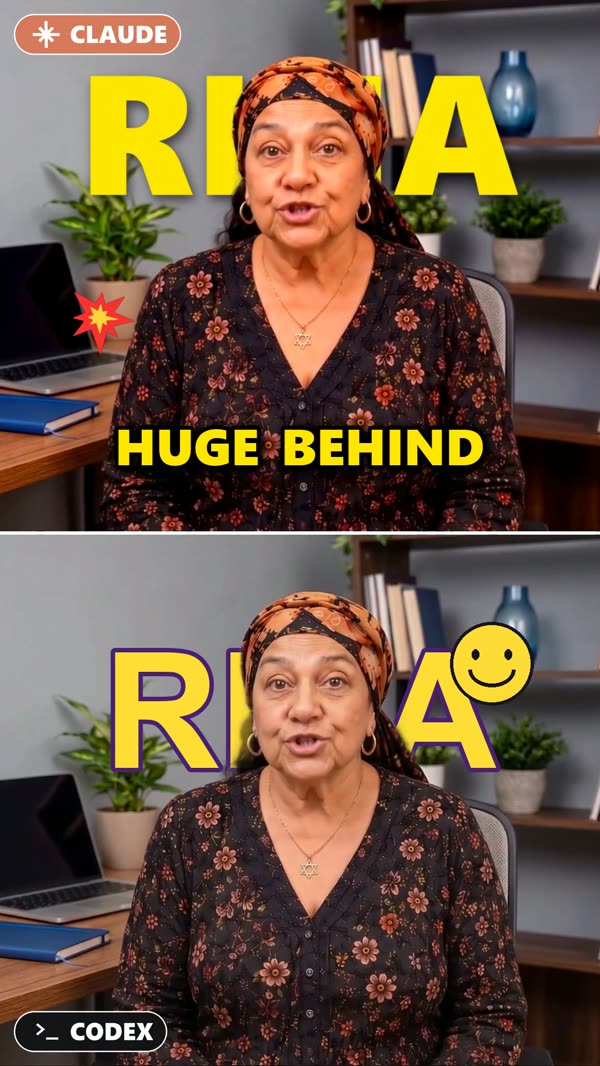
We'll leave the verdict to you. What you can take from the battle is how to work well with both tools.
What they can actually do
Neither of them is an editing app with a timeline. They write code that edits for you, so they're good at whatever you can describe in words and timings:
- Styled captions in any font, color and size, with keywords highlighted.
- An effect that lands on a word: say "Instagram" and the icon pops on that exact frame.
- Text behind the speaker: the name huge in the background, the head in front of it.
- Color and mood: warm, cinematic, black and white, neon or spotlight.
- Motion: zooms, shakes, flashes and glitches, exactly where they belong.
Honestly, the limits: there's no timeline to drag, so you need to know how to describe. Renders take a few minutes and sometimes need a fix round. Effects like a carousel behind the speaker need clean footage: a simple background and even light.
Two ways to give instructions: voice or prompt
By voice, inside the video. You say on camera what you want, like Rina did in the battle, and the tool transcribes and edits to match. It's striking and fun to watch, but it's only one way.
By written prompt. You film normally, without a word about the edit, and write the style, the effect for each word and the opening hook in the chat. That's how most everyday edits are done.
The workflow in five steps
- Film it right. Medium shot, you in the center, room on the sides, a clean background and even light. Half a second of silence before and after each sentence.
- Ask for a transcript with a timestamp for every word. Every word-triggered effect is built on it.
- Describe it in plain words, by prompt or by voice, like you would to a human editor: "when I say X, do Y".
- Still frames before the render. A few frames catch a mistake in seconds, not after a ten-minute render.
- One focused fix round: one list with every note, not a drip.
The prompts
Editing by written prompt, when nothing is said about the edit in the video:
I'm uploading a raw talking-head video. Edit it like this:

STYLE: warm, cinematic color. Clean and premium, not busy.
CUTS: remove every silence longer than 0.3s. Keep every word I say.
HOOK: first 2 seconds, a big title at the top: "[your hook]"
CAPTIONS: one line, bold white, the key word of each sentence in gold.
ON WORDS:
- when I say "[word]", pop [an icon / an image] next to my shoulder
- on every punchline, a quick zoom-in
- on "[word]", a white flash

Before rendering the full video, show me still frames from the key moments.
The battle prompt, when the instructions are spoken inside the video. We locked the length only for a fair comparison; in a normal edit you can ask it to cut silences too.
I'm uploading a raw talking-head video.
In the video, I tell you out loud how I want it edited.
Listen to what I say and edit it exactly the way I describe,
with every effect landing on the exact word I say it.

RULES:
1. Do NOT cut, trim, extend, or change the speed of the footage.
   The output must be exactly the same length as the input, frame for frame.
2. Only add layers on top: captions, graphic elements, effects, color, zooms.
3. Keep the original audio exactly as it is.
4. Before rendering the full video, show me still frames from the key moments.
5. After rendering, check the output length and confirm it matches the input.

Here is exactly what I say in the video:
[paste your words here]
Tips that save hours
- One word per effect. "When I say boom" works far better than "add some action in the middle".
- Always ask for frames before the render. A one-second check saves a full render.
- Make it check itself: "check the length is right and that no word is missing".
- Bigger captions than you think, because everything looks smaller on a phone.
- One effect at a time, so when something breaks, you know what.
- It's fine to say no: "this looks cheap, make it subtler" is great feedback.
How to build your own editing style
When everyone edits with the same tools, style is what sets you apart. Here's how to build one without being an editor:
- Start from references: 2–3 reels whose editing you love, to understand what exactly grabbed you.
- Ask for a breakdown: font, words on screen, cutting pace, color, motion and sound.
- Pick one signature that's only yours: a gold keyword, a zoom on every question, a handwritten caption.
- Write three "always" rules and three "never" rules.
- Every effect needs a reason: a zoom marks a punchline, a flash marks a transition, silence marks a key moment.
- Test it on three different videos, calm and energetic. Whatever breaks in one of them leaves the style.
- Save it as a Skill and keep improving: every repeated note goes into the skill, and every version beats the last.
The reference breakdown prompt:
I'm uploading 3 reels whose editing style I love.
Break down each one, frame by frame:
- captions: font, size, position, words on screen at once, highlight color
- cutting pace: average seconds per cut, how silences are handled
- color: the overall look
- motion: which effects, and on which moments (hook, punchline, CTA)
- sound: music, sound effects, silence

Then write me ONE style card that combines what they have in common,
plus 3 "always" rules and 3 "never" rules.
Don't copy any of them. Give me something that feels like mine.
The save-my-style prompt:
Save the editing style we just built as a Skill called "my-style".
Include the style card, the always/never rules,
and every correction I gave you in this chat.
From now on, when I say "edit in my-style", use it.
What to install
- Claude Code or Codex: the tools that edit. You can ask them to install everything else.
- FFmpeg: the free engine that processes the video.
- Whisper: transcription with an exact timestamp for every word.
- Remotion: for higher-end motion graphics, with official skills for Claude Code. Install:
npx skills add remotion-dev/skills
Everyone will edit with AI.
Few will look different.
- The same captions, the same zooms, the same "AI look"
- The tools are open to everyone, so the edge isn't the tool anymore
- Whoever stands out is whoever knows how to direct the AI
We're building something beyond guides: a way to turn AI into your own content director. A director that develops a style that's only yours, plans, directs and edits.
Only updates about the announcement. No spam, unsubscribe anytime.
The next battle is on its way: follow on Instagram ↗Want to learn how to direct a result with AI, not just write a prompt? Open the full guide →
Want your team to edit like this?
A hands-on workshop where your team builds its own editing style with Claude and Codex, on your brand's material.
FAQ
Can Claude edit video?+
Yes. Claude Code writes and runs code that edits the video: captions, elements that land on a word, zooms, color and text behind the speaker. You describe what you want in words, ask for still frames to check, then render. Underneath it uses FFmpeg and word-level transcription.
What's the difference between editing by voice and editing by prompt?+
With voice, you say on camera what you want and the tool transcribes and edits to match. With a prompt, you film normally and write the style and the effect for each word in the chat. Most everyday edits are done by prompt; voice is a striking way to show the tool is listening.
What do I need to install to edit like this?+
Claude Code or Codex, FFmpeg for the video processing, and a transcription tool such as Whisper. For higher-end motion graphics, add Remotion with its official skills for Claude Code. You can ask Claude to install all of it.
How do I build my own editing style with AI?+
Start from two or three references, ask Claude to break them down into a style card, pick one signature and write three always-rules and three never-rules. Test it on three different videos and save the style as a Skill, so every future edit starts from it.